I. Pengenalan
A. Definisi REST-API
REST-API adalah singkatan dari Representational State Transfer Application Programming Interface, yang merupakan suatu teknologi yang digunakan untuk mengirim dan menerima data melalui protokol HTTP dengan format data yang umum seperti XML atau JSON.
B. Tujuan pembuatan REST-API
Tujuan utama pembuatan REST-API adalah untuk memungkinkan aplikasi dan sistem yang berbeda untuk saling berkomunikasi dan bertukar data secara terstruktur, fleksibel, dan mudah diakses melalui jaringan internet.
C. Tools yang digunakan
Dalam pembuatan REST-API menggunakan Node.js, beberapa tools yang digunakan antara lain:
- Node.js – untuk menjalankan kode JavaScript di sisi server.
- Nodemon – digunakan untuk memonitor perubahan kode secara otomatis dan menghidupkan ulang server.
- Postman – untuk menguji dan melakukan request terhadap REST-API yang telah dibuat.
study case : rest-api-bookself
Langkah-langkah
A. Preparation
- pastikan node.js telah terinstall
- jika belum silahkan ikuti panduan instalasi berikut link
- install dependencies berikut:
npm install -g nodemon- (automatic restart node if there is code update)
npm i @hapi/hapi- (framework API)
npm i nanoid- (generate random id)
- inisialisasi project folder
npm init --y
- buat file main.js pada file project
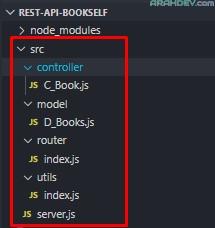
- buat folder src/ dan sub direktori berikut dalam file project

- src/controller/C_Book.js
- (kode logika)
- src/model/D_Books.js
- (kode data)
- src/router/index.js
- (kode path)
- src/utils/index.js
- (kode pelengkap)
- src/server.js
- src/controller/C_Book.js
B. Core
Membuat Server dan Endpoint
1.pada file main.js
const runServer = require('./src/server')

runServer()
2.pada file server.js
const Hapi = require('@hapi/hapi')
const router = require('./router');

const init = async () => {
  const server = Hapi.server({
    port: 9000,
    host: 'localhost',
    routes: {
      cors: {
        origin: ['*'],
      },
    },
  });

  server.route(router);

  await server.start();
  console.log(`Server berjalan pada ${server.info.uri}`);
};

module.exports = init
Membuat data array sebagai database
3.pada file D_Books.js
const D_Books = [];

module.exports = D_Books;
Membuat Endpoint CRUD
4.Pada file router/index.js
const {
  postNewBook,
  getAllBook,
  getBookById,
  updateBookById,
  deleteBookById
} = require('../controller/C_Book')

  const routes = [
    {
      method: 'POST',
      path: '/books',
      handler: postNewBook,
    },
    {
      method: 'GET',
      path: '/books',
      handler: getAllBook,
    },
    {
      method: 'GET',
      path: '/books/{id}',
      handler: getBookById,
    },
    {
      method: 'PUT',
      path: '/books/{id}',
      handler: updateBookById,
    },
    {
      method: 'DELETE',
      path: '/books/{id}',
      handler: deleteBookById,
    },
  ];

  module.exports = routes;
Membuat utlitas agar code lebih rapi
5. pada file utils/index.js
  const successWithoutMessage = (h, code, data) => {
    const response = h.response({
      status: 'success',
      data,
    });
    response.code(code);
    return response;
  };

  const successWithMessage = (h, code, message, data = null) => {
    let response;
    if (data === null) {
      response = h.response({
        status: 'success',
        message,
      });
    } else {
      response = h.response({
        status: 'success',
        message,
        data,
      });
    }
    response.code(code);
    return response;
  };

  const failed = (h, code, message) => {
    const response = h.response({
      status: code >= 400 && code < 500 ? 'fail' : 'error',
      message,
    });
    response.code(code);
    return response;
  };

  const getDate = () => new Date().toISOString();

  const validation = (data, type) => {
    const message = `Gagal ${type === 'create' ? 'menambahkan' : 'memperbarui'} buku.`;

    if (data.name === null || data.name === undefined) {
      return { status: false, message: `${message} Mohon isi nama buku` };
    }
    if (data.readPage > data.pageCount) {
      return { status: false, message: `${message} readPage tidak boleh lebih besar dari pageCount` };
    }

    return { status: true, message: 'Valid' };
  };

  const filter = (key, value, data = []) => {
    if (value != null && typeof (parseInt(value)) === 'number') {
      return data.filter(v => (parseInt(value) === 1 ? v[key] === true : v[key] === false));
    }
    return data;
  };

  module.exports = {
    successWithoutMessage,
    successWithMessage,
    failed,
    getDate,
    validation,
    filter,
  };
mengatur aksi dari tiap endpoint di controller
6. pada file controller/C_Book.js
const { nanoid }  = require('nanoid')
const D_Books = require('../model/D_Books')
const {
  successWithoutMessage,
  successWithMessage,
  validation,
  getDate,
  failed
} = require('../utils')

const postNewBook = (request, h) => {
  let res=''

  const {
    name,
    year,
    author,
    summary,
    publisher,
    pageCount,
    readPage,
    reading
  } = request.payload;

  // validation
  const valid = validation({ name, readPage, pageCount }, 'create');

  if(!valid.status){
    return failed(h, 400, valid.message);

  } else {

    const id  = nanoid(16)
    const finished = (pageCount === readPage)
    const insertedAt = getDate()
    const updatedAt  = insertedAt

    const newBook = {
      id,
      name,
      year,
      author,
      summary,
      publisher,
      pageCount,
      readPage,
      reading,
      finished,
      insertedAt,
      updatedAt,
    }

    // insert
    D_Books.push(newBook)

    const isSuccess = D_Books.filter(D_Books=>D_Books.id === id).length > 0

    if(isSuccess){
      return successWithMessage(h, 201, "Buku berhasil ditambahkan" , {bookId:id} );

    }else{
      return failed(h, 404, 'Buku tidak ditemukan');
    }
  }
}

const updateBookById = (request, h) => {
  const { id } = request.params;

  const {
    name, year, author, summary, publisher, pageCount, readPage, reading,
  } = request.payload;

  const finished = pageCount === readPage;
  const index = D_Books.findIndex(data => data.id === id);
  const valid = validation({ name, readPage, pageCount }, 'update');

  if (!valid.status) {
    return failed(h, 400, valid.message);
  }else if (index !== -1) {
    D_Books[index] = {
      ...D_Books[index],
      name,
      year,
      author,
      summary,
      publisher,
      pageCount,
      readPage,
      finished,
      reading,
      getDate,
    };

    return successWithMessage(h, 200, 'Buku berhasil diperbarui', {
      id: D_Books[index].id,
      name: D_Books[index].name,
      publisher: D_Books[index].publisher,
    });

  }else{
    return failed(h, 404, 'Gagal memperbarui buku. Id tidak ditemukan');
  }

};

const deleteBookById = (request, h) => {
  const {id} = request.params;
  const book = D_Books.findIndex((D_Books) => D_Books.id === id);

  if (book !== -1) {
    D_Books.splice(D_Books, 1);
    return successWithMessage(h, 200, 'Buku berhasil dihapus');
  } else {
    return failed(h, 404, 'Buku gagal dihapus. Id tidak ditemukan')
  }
};

const getBookById = (request, h) => {

  const {id} = request.params;
  const book = D_Books.filter((data) => data.id === id)[0];

  if (book !== undefined) {
    return successWithoutMessage(h, 200, {book:book})

  } else {
    return failed(h, 404, 'Buku tidak ditemukan');
  }
}

const getAllBook = (request, h) => {
  let booksResponse = D_Books;

  booksResponse = D_Books.map((D_Books)=>{
    return {
      'id': D_Books.id,
      'name': D_Books.name,
      'publisher': D_Books.publisher,
    };
  });

  return successWithoutMessage(h, 200, {books: booksResponse} )
};

module.exports = {
  postNewBook,
  getAllBook,
  getBookById,
  updateBookById,
  deleteBookById
}
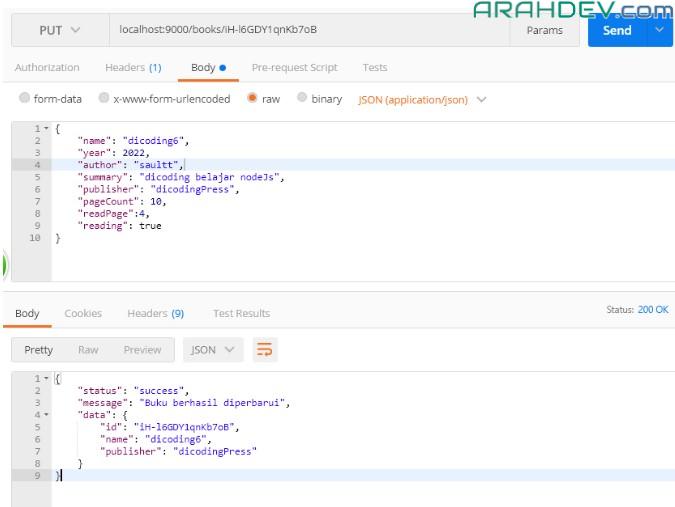
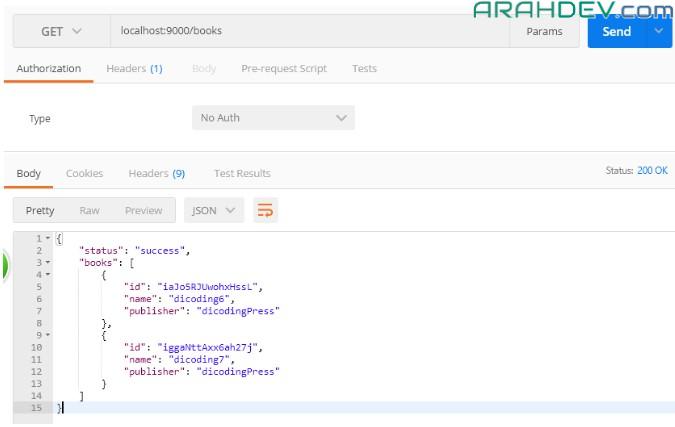
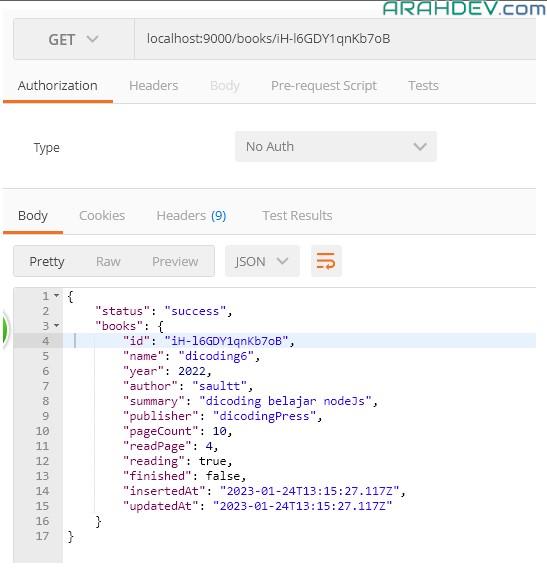
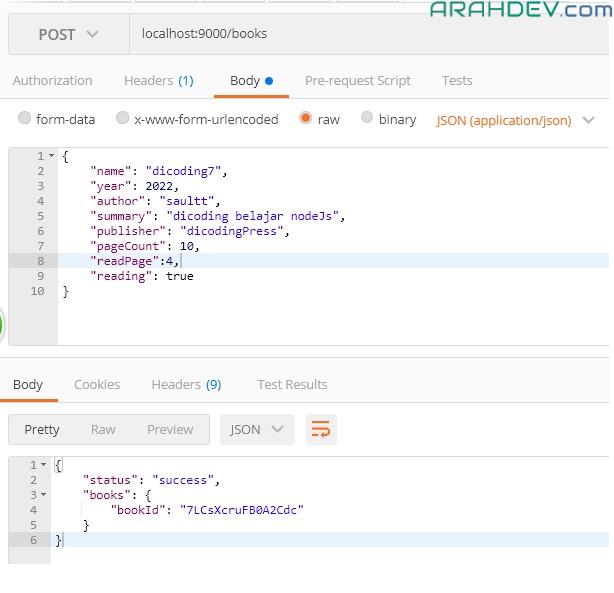
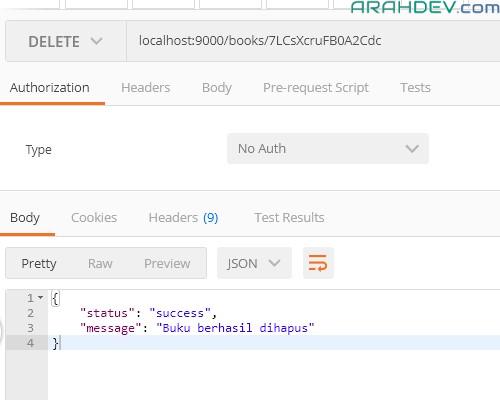
C. Uji Coba dengan postman
- update data
- get all data
- get data by id
- create new data
- delete data by id
link github https://github.com/42win/rest-api-bookself