others
Mengaktifkan virtual host xampp server
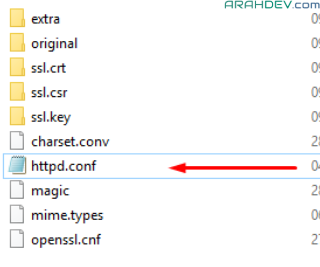
- buka file konfigurasi xampp (httpd.conf)
- di linux : /opt/lampp/etc
- di windows : xampp/apache/conf/

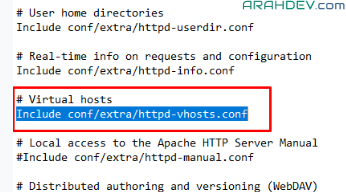
- buka file tersebut dan cari virtual host

- jika #Include conf/extra/httpd-vhosts.conf
- hilangkan tanda #
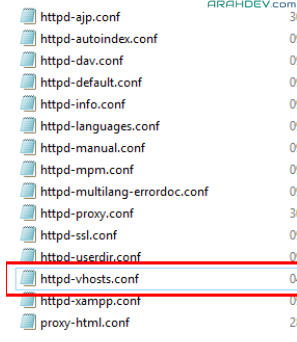
- buka file konfigurasi virtual host xampp (httpd-vhosts.conf)
- di linux : /opt/lampp/etc/extra
- di windows : xampp/apache/conf/extra/

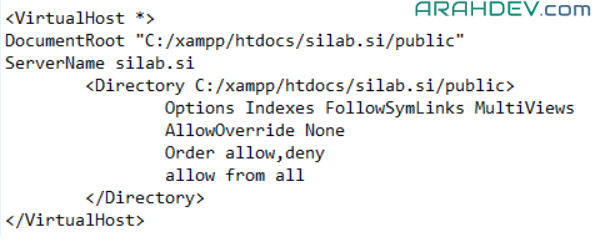
- ketiikan script berikut dibawah
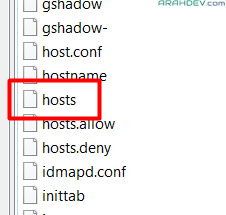
- buka file host
- di linux : /etc
- di windows : C:/windows/system32/drivers/etc/

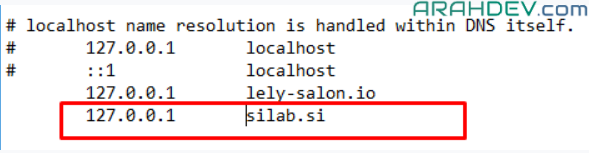
- tambahkan script dibawah ini
- Kemudian restart apache kalian dan coba akses virtual hostnya di broswer pc dimana xampp terinstall
- http://silab.si
- pastikan internet mati agar urlnya tidak mengarah ke internet karena kita belum mendaftarkan domain tersebut hanya sebatas di host local