Hosting Website Statis using AWS S3
Website statis adalah jenis website yang dibangun dengan menggunakan file HTML, CSS, dan JavaScript. Website ini tidak memiliki komponen server-side seperti database atau scripting server-side. Sebaliknya, website ini hanya terdiri dari file statis yang disajikan ke pengguna langsung dari server web. Website statis biasanya lebih cepat dan lebih mudah dikembangkan daripada website dinamis yang kompleks.
Salah satu cara untuk meng-hosting website statis adalah dengan menggunakan layanan AWS S3 (Amazon Simple Storage Service). AWS S3 adalah layanan penyimpanan objek yang menyediakan ruang penyimpanan untuk file dan objek, termasuk file HTML, CSS, dan JavaScript untuk website statis.
Meng-hosting website statis di AWS S3 memiliki beberapa keuntungan, di antaranya:
- Biaya rendah: AWS S3 menawarkan harga yang rendah untuk hosting website statis. Biaya hosting hanya dikenakan pada jumlah data yang disimpan dan permintaan yang dibuat, yang lebih rendah daripada biaya hosting website dinamis yang kompleks.
- Skalabilitas: AWS S3 dirancang untuk dapat menangani jumlah data yang besar dan skala yang tinggi. Jadi, Anda dapat meng-hosting website statis dengan mudah dan dapat meningkatkan kapasitas penyimpanan dan kinerja website jika diperlukan.
- Keamanan: AWS S3 memiliki fitur keamanan yang kuat, termasuk enkripsi data saat istirahat dan saat transit. Ini membuat website Anda lebih aman dan dapat diandalkan.
Study Case :

- Q : Client
- Y : Anda

- Q : Hello and welcome to the city! it is a pleasure to meet you
- Y : Hi! it is nice to meet you too. i am happy to join the team! so how i can help you?
- Q : Our data center power most of the technical infrastructure here in the city, but it takes months to procure and configure resources
- Y : That is a pretty common problem. when provisioning your own infrastructure. can you give me a more spesific example?
- Q : sure. right now, everyone on the island goes to the customer portal to view the current wave size projections at the beach each day. surfers check this webpage for big waves, and families want to know the the waves are lower for safety reasons
- Q : currently, we have some challenges keeping the servers that deliver the wave size projections up and running
- Y : have you considered using an aws cloud infrastructure? it can significantly improve your agility and resiliency
- Q : Interesting! i have heard a lot about the cloud, but i am not sure i understand the entire concept
- Y : cloud computing on aws provides access to technology services, such as compute power, storage, and databases. resources are available on demand, and you pay only for what you use. you can choose from hundreds of aws services to help build your solutions.
- Q : the cloud sounds promising, but how can it improve my agility? how many days does it take to bring a server online?
- Y : with aws, you can deploy resources, such as servers, in minutes and at a fraction of the cost of traditional resources. with this type of flexibility, you can transform your operations
- Q : well, if it is that fast, i’d like to know how to get a server running quickly to bring our wave size webpage back online. and we also want the website to be more resilient to hardware failures
- Y : does your webpage include any scripts that must run on the web server? these are known as server-side scripts. if your site doesn’t run server-side scripts, it is a static website
- Q : let me check my notes from IT.. Yes, it says here that the website is static. does that help?
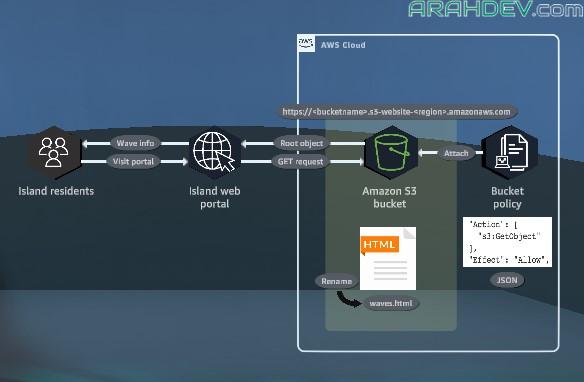
- Y : yes. because you are running a static website, we can migrate your webpage to an amazon s3 bucket and use the static website hosting feature. this move to amazon s3 will get you back up and running quickly and make your site more resistant to failure. we can start by creating a new s3 bucket to hold your webpage content.
- Q : do we need to run a web server to publish the webpage?
- Y : using amazon s3, you can store any type or amount of data and retrieve it from anywhere. after your data into the s3 bucket, we can enable the static website hosting feature on the bucket.
- Y : because amazon s3 is a fully managed service, you dont need to deploy or manage any servers. s3 Buckets are automatically replicated across multiple aws data centers for high resiliency.
- Y : also, any website hosted in an s3 bucket an automatically scale to handle thousands of concurrent requests
- Q : nice! i’d like to see this solution in action
- Q : can you start now? residents are avoiding the beach because the wave size
Practice Lab Goals :

- buat amazon s3 bucket
- enable static website hosting
- secure the s3 bucket by using a bucket policy
Practice
- In the top navigation bar search box, type: S3
- In the search results, under Services, click S3.

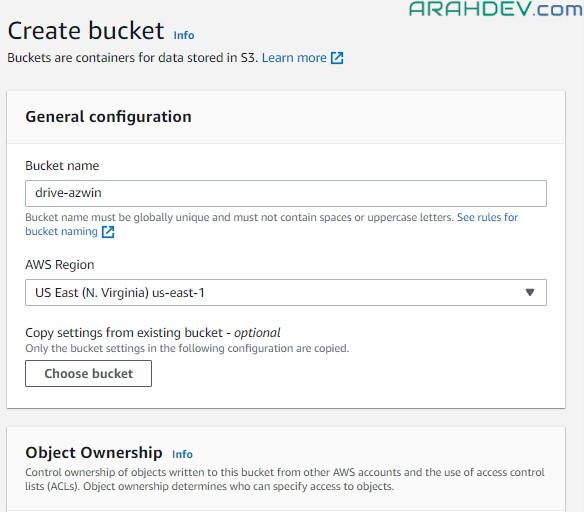
- in the Buckets section, click Create bucket.
- In the General configuration section, for Bucket name, type a unique name for your bucket, and then copy the name to the text editor of your choice on your device (or write it down).

- For AWS Region, on the dropdown menu, choose US East (N. Virginia) us-east-1.
- You must choose us-east-1 for this lab.
- In the Object Ownership section, choose ACLs enabled.

- Choose Object writer.
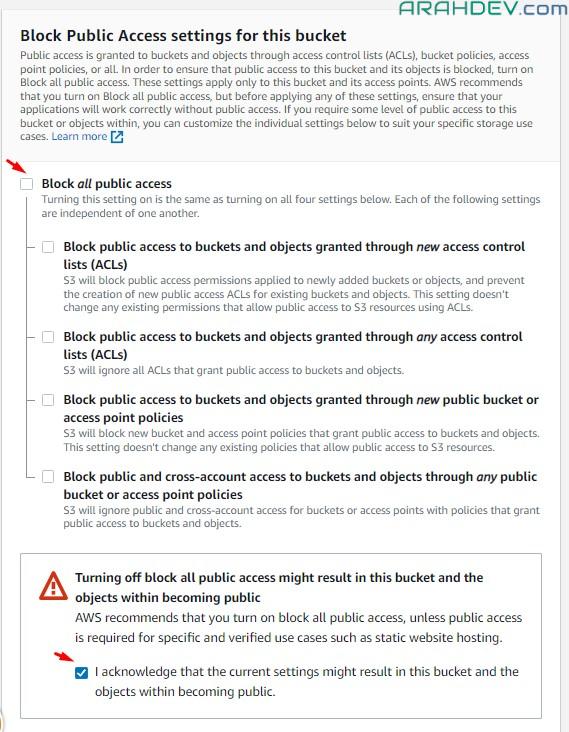
- Scroll down to Block Public Access settings for this bucket.

- In the Block Public Access settings for this bucket section, clear the check box to deselect Block all public access.
- In the warning alert, choose the check box to select the acknowledgement statement.
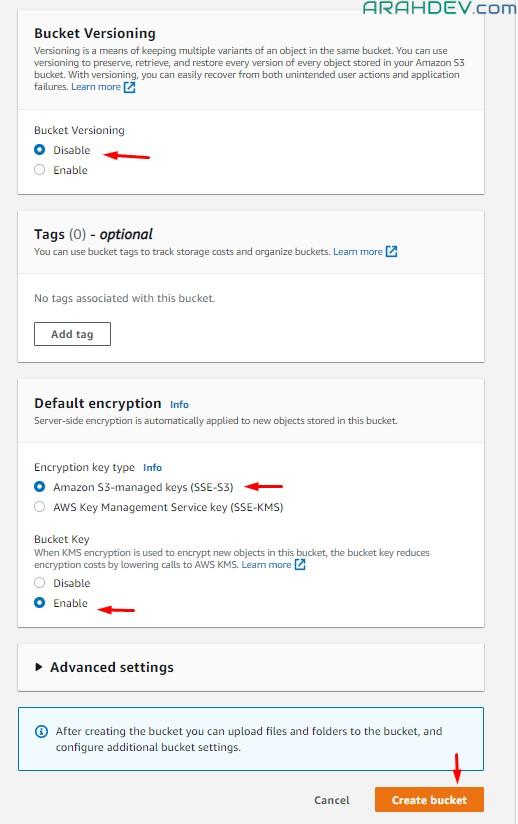
- keep default values and then create bucket
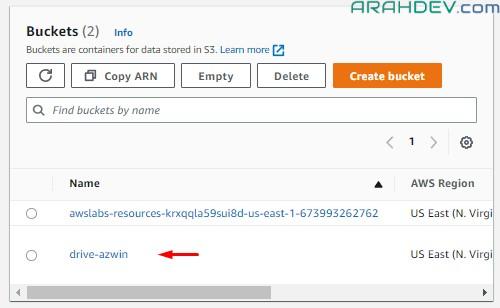
- bucket berhasil dibuat, please klik the bucket to show detail bucket
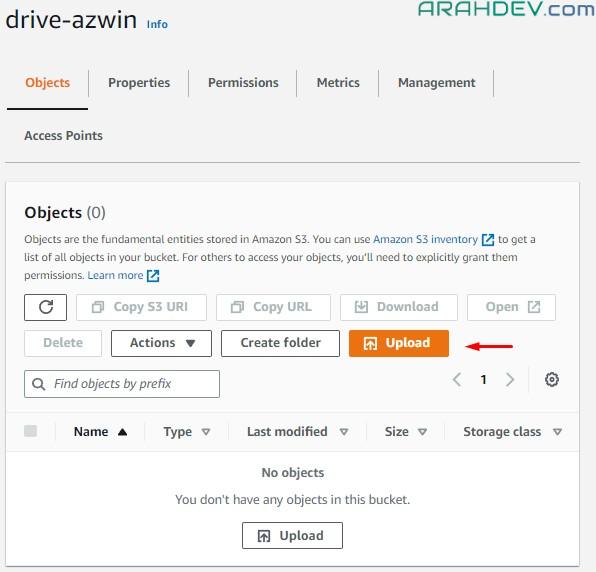
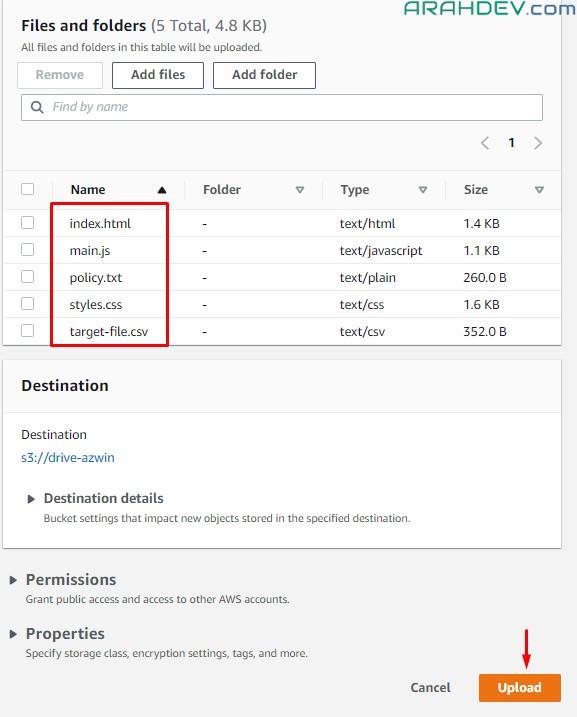
- On the Objects tab, click Upload.
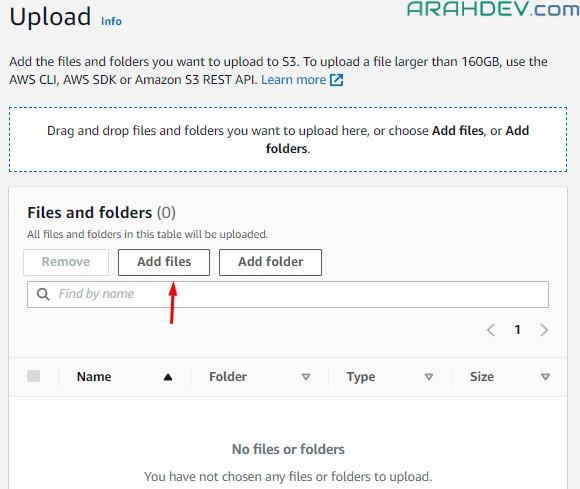
- In the Files and folders section, click Add files.
- chose lab files and open
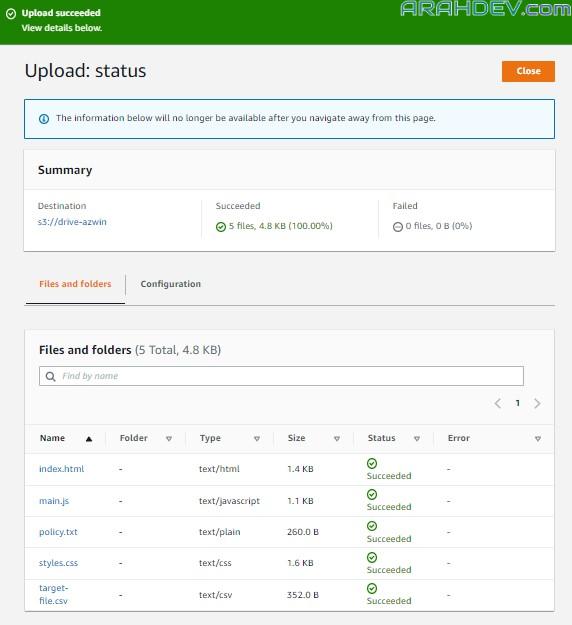
- In the Files and folders section, review to ensure that the four files are uploaded.

- click close

- On the Objects tab, choose the check box to select index.html.
- Click Actions to expand the dropdown menu.
- Review the available options.
- You have different options to manage your objects, such as rename, copy, and download.

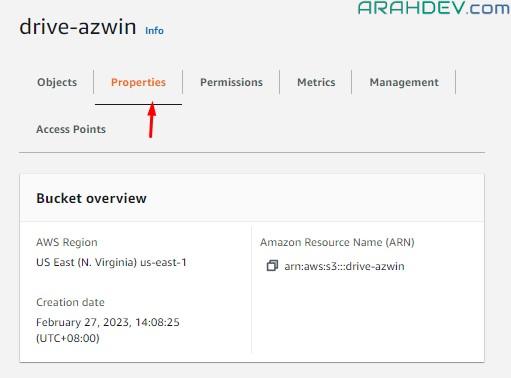
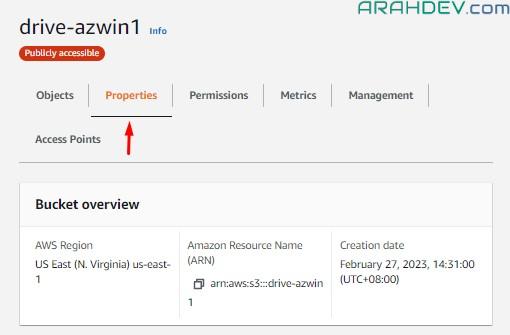
- Click the Properties tab.
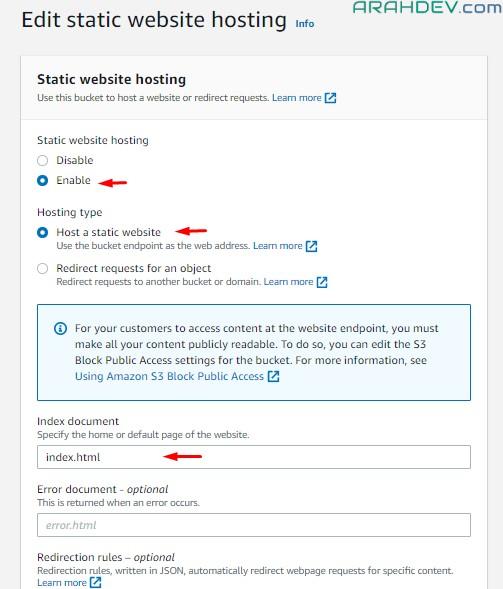
- Scroll down to Static website hosting.
- Click Edit.

- For Static website hosting, choose Enable.
- For Hosting type, choose Host a static website.
- For Index document, type: index.html
- Scroll down to the bottom of the page.
- Click Save changes.


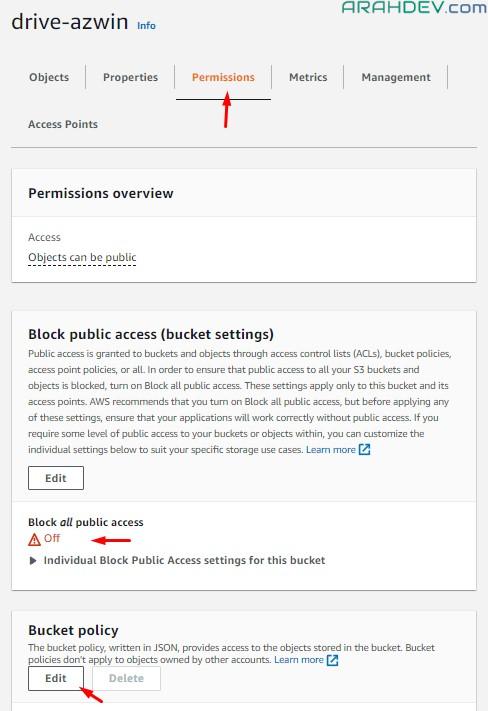
- Click the Permissions tab.
- In the Block public access (bucket settings) section, review to ensure that Block all public access is set to Off.
- In the Bucket policy section, click Edit.

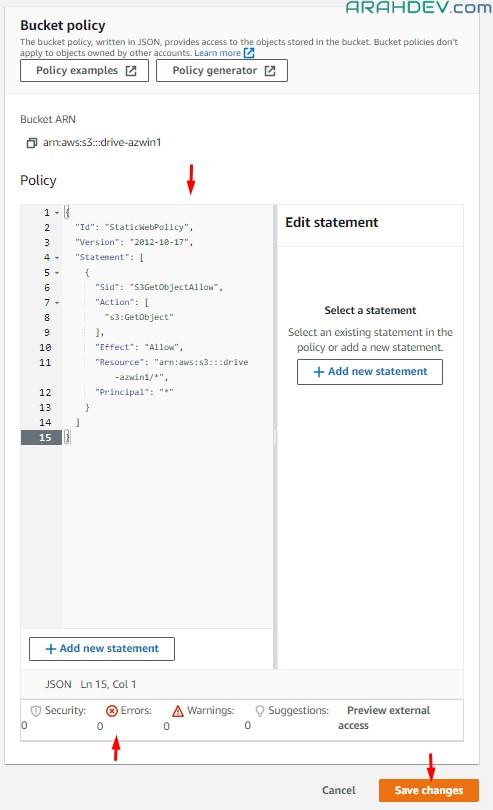
- In the Policy editor window, delete the current content.
- You might see an AccessDenied error message under Edit statement. You can safely ignore this message.
- Open (double-click) the policy.txt file on your device t, and then review the content.
- You downloaded this policy.txt file in an earlier step.
- The policy grants the s3:GetObject permission to any public anonymous users.
- In the policy, replace Your_Bucket_ARN with the bucket ARN that you copied earlier.* see the example in the below of this articel.
- Copy the updated policy.txt file content, and then paste it in the Policy editor window.
- Review to ensure that /* appears at the end of the ARN.

- Click the Properties tab.
- Scroll down to Static website hosting.
- In the Static website hosting section, under Hosting type, review to ensure that Bucket hosting is set.
- Under Bucket website endpoint, click the copy icon to copy your bucket website endpoint.


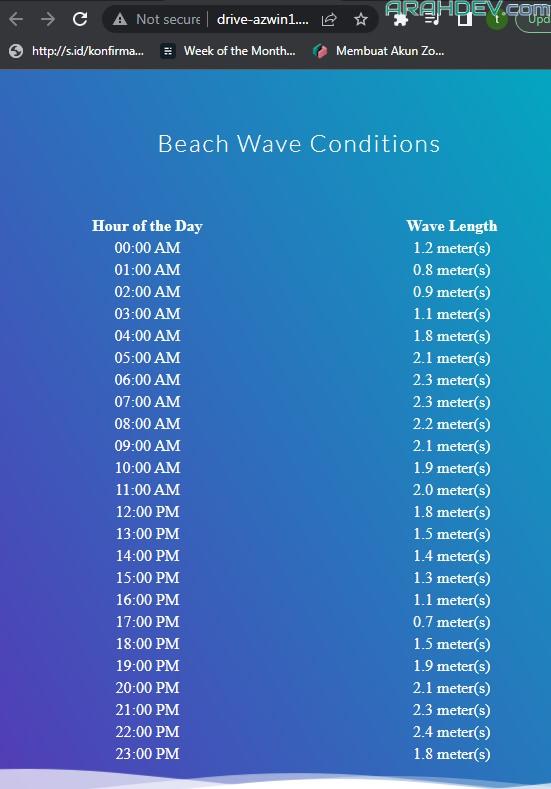
- To load the website, open a new browser tab or window, and then, in the address bar, paste the Amazon S3 bucket website endpoint that you just copied, and press Enter.







catatan,
- policy.txt yang dimasukkan ke policy rule
{
  "Id": "StaticWebPolicy",
  "Version": "2012-10-17",
  "Statement": [
    {
      "Sid": "S3GetObjectAllow",
      "Action": [
        "s3:GetObject"
      ],
      "Effect": "Allow",
      "Resource": "arn:aws:s3:::drive-azwin1/*",
      "Principal": "*"
    }
  ]
}